
-
raynovich
posted in technical issues • read moreAny help with iemguts? Do others have problems with that library too? renamed the library to iemguts_old, then downloaded it again. Still states it cannot be loaded.
But the objects seemed to work.

-
posted in technical issues • read more
The newer version also has something tied to "remembering" and/or keystrokes thought too, which is the problem.
I took out the learn/forget object and it works like it used to.
-
posted in technical issues • read more
OK, so, I may have identified part of the problem, if not the root of the problem. I was using an older version of the else library. The new else's gain~ has a new set of objects that I believe takes a lot of CPU to run.
The original version was working. What is the best practice when something like this occurs?
The object that I think is creating the issue is: pd learn/forget
Do I make my own gain~ object?
-
posted in technical issues • read more
Thank you. I am grateful for your prompt responses.
So, I had a problem a few years back that you or someone else resolved. I am not sure why it has crept back in.
gain~ from the else library needs to be saved everytime I close the program. There was something I needed to do so that did not happen. I am sorry I forgot.
Also, oddly, most of my patches are taking a LONG TIME to close when I close the main window. I am not sure what happened. To give some background, my last computer is a 2018 mac and the patches close at reasonably quickly, now it seems like there is almost a freezing. I am now on a 2025 mac.
iemguts cannot seem to load. I believe I added the library. But when I reopen pd, the Pd window states: can't load library.
-
posted in technical issues • read more
So, an update. I tried to delete zexy library and then re-upload it, but that does not seem to work.
-
posted in technical issues • read more
OK, I seemed to get it working by declaring the libraries used and not relying on the Preferences. Is that common? Am I doing something wrong?
-
posted in technical issues • read more
Hello all,
So, I had to get that new computer. Now I am transferring all my files and somethings are not working on the new computer. They might be in the zexy external.Here are some that are not working:
s2l . . . what I want to do is count how many characters are in a symbol (word). So each character should be separated. It does not seem to be working any longer.
minmax
date
timeAny ideas? I would be very grateful.
-
posted in technical issues • read more
I assume one just has to "deal" with this, but if you put a label on a number or list object then you cannot use Find... to locate all the places the variable occurs. This is frustrating, but I guess it is just the way it is.
Right?
-
-
posted in technical issues • read more
Thanks will look at that file.
I was trying the |table normalize(
-
posted in technical issues • read more
Greetings,
Is there a way to tell if the normalize action is working? Or do you just have to wait? -
posted in technical issues • read more
Thank you so much for the feedback. I understand most of what you have indicated here.
-
posted in technical issues • read more
Interesting solution. I went to Gem because ofelia seemed to be less in favor and not being updated?
@alexandros said:
I think Pof, which embeds openFrameworks (much like Ofelia did), runs on a different thread (I think). But I have tried closing its window and that crashes Pd. But I could be wrong, as I could be doing this the wrong way.
Switching back to another external that embeds OF, since you have switched from Ofelia to Gem, can be discouraging. I just thought of mentioning that Pof runs on a different thread (I think). -
-
posted in technical issues • read more
Hey, I am doing as you exactly point out. I am opening Gem before the concert set begins. I have not yet tested the concert to see if that creates additional dropouts.
Now your other idea to run Gem somewhere else, sound enticing. I am not sure I am "knowledge" to be able to do that right now, but I like it.
@ddw_music said:
Well, if you load a large audio file while sound is playing, you can get dropouts then too.
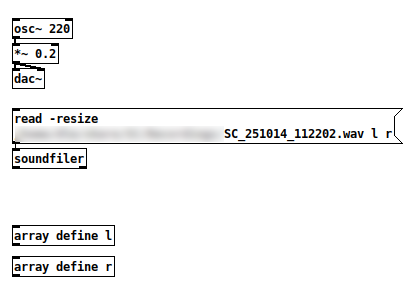
That's a 97.3 MB file -- "audio I/O error." Only vanilla objects in the patch. Sending that read message does glitch the audio.
So this isn't "a Gem issue."
Since Pd is single-threaded and the control message layer runs within the audio loop, heavy activities in the control message layer can cause audio processing to be late. Reading a hundred MB of audio?
 Opening a window and preparing it for graphics rendering?
 AFAIK the available solutions are: A/ structure your environment so that all heavy initialization takes place before you start performing -- i.e., start Gem before your show, not during. Or B/ Put Gem in a different Pd process (which doesn't have to be [pd~] -- you could also run a second, completely independent Pd instance and use OSC to communicate between them). (Smart-alecky suggestion: Or C/ Move your audio production over to SuperCollider, whose audio engine shunts heavy loading off to lower-priority threads and whose control layer runs in a separate process, so it doesn't suffer this kind of dropout quite so easily.)
"Except that dropout when you create and destroy. Wish that could be changed" -- sure, but the issue is baked into Pd's fundamental design, and would require a radical redesign (of Pd) to fix properly.
hjh
-
posted in technical issues • read more
Maybe it is quarantining then. I changed the pathway to where the file is but the folder was not recognized by Pd. Perhaps, and very likely, Mac is doing things to make the folder not findable.
-
posted in technical issues • read more
Hey,
Maybe this is with all externals, but I have been looking into transferring patches to other computers. I do not understand why, and I assume there is a reasonable explanation.The patches I have made, I merely just transfer to the new computer. Easy. The patches that are externals, at least in deken, but maybe others as well have to be downloaded again. I tried just moving all of the files to the new computer (I am using macs). I put the files in the location where all the files were documents/Pd/externals.
As I write this, I realize the name of the account might be different which might be the reason Pd cannot find the files. Or is it that the files have to be recompiled.
I am not sure if I had to recompile the files the last time I changed computers which was in 2018 or 2019. I transferred my entire account from one computer to another computer.
Is it common to have to recompile? I assume so. Is there a way around this? At the same time, it might be good to recompile so that I can get any updates from the last time I got the externals.
Any thoughts would be greatly appreciated so that I can understand better.
-
posted in technical issues • read more
Ha!!!! Yeah. . . I perform live while performing. I am already at a 50ms delay, which makes performance a bit challenging to say the least. I am also trying to get the delay shorter more like 25ms.
-
posted in technical issues • read more
Thank you for the confirmation. I appreciate it.
I have changed all of my patches from ofelia to GEM. It seems to be working fairly well. I am pleased. Gem seems to be somewhat fragile.
It can crash the system.
It does not seem to take up too much CPU and can run in the background. I am currently pleased.
Except that dropout when you create and destroy. Wish that could be changed.
-
posted in technical issues • read more
So, I am switching all of my visuals to GEM from Ofelia. It seems to mostly be working.
I do have a question. When I am using audio I cannot create or destroy a GEM window without getting digital distortion/dropout. Is that just the way it is? Am I doing something wrong?