-
 lacuna
posted in abstract~ • read more
lacuna
posted in abstract~ • read moreSmall abstraction, made with
[sort(
|
[text define]
.
array-sort-help.pd
array-sort.pd(It's faster than https://forum.puredata.info/topic/15663/array-maxx-and-array-minn-get-multiple-peaks-of-an-array-does-array-sort )
-
lacuna
posted in technical issues • read more
write random values in an array.
In helpfile of [block~] [pd switch-bang] shows an easy way.
Or fill the array with [tabwrite] by banging a counter and [random] with [until] which is fed by [array size]. -
lacuna
posted in technical issues • read more
@ddw_music wrote:
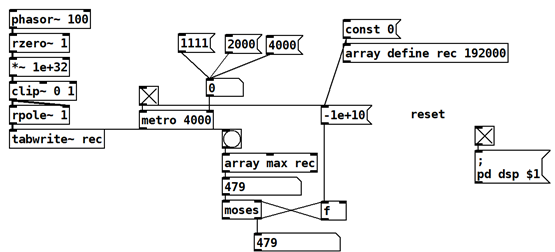
phasor~ for reset, the period is not 100% exact
Now I remember long time ago there has been a thread about very slow <1Hz [osc~] LFO being off.
@y0g1 wrote:
I count only 256 samples, I assume it will be precise then ?
Probably yes.
-
lacuna
posted in technical issues • read more
@y0g1 wrote:
cpu friendly ?
I doubt that this simple checking and accumulating is very expensive.
(in the other thread, in the screenshot I see many [fexpr~] that you could replace with [expr~] or other Vanilla objects.)@ddw_music wrote:
should range from 0 to 479999 samples, but I actually get 479991.
Oh, this is very bad news! I always thought that phasor~ frequency would be spot on.
(There are very few people who understand [phasor~]s code, here is a thread https://forum.pdpatchrepo.info/topic/14523/90-second-limit-on-audio-buffers)
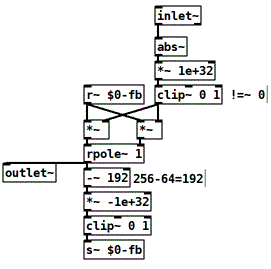
Ok, this means in Pd-world a sample-counter made with phasor~ would be bad design.Here is one more patch, this circles between 0 and 255 and stops and resets when input sig == 0.
@jameslo wrote:
signal changes to a non-zero value
This would require to add or subtract sth like the [rzero~ 1] [*~ 1e+32][clip~] trick in the inlet.
Edit: Now I realize that in case it stops at counting 0, it never restarts. Adding a [+~ 1] in the feedback-path should fix this.
2nd Edit: But then it's not cicling anymore...hmmm don't know how to fix this. Maybe instead [rzero~ 1] [*~1e+32][clip~] trick on the inlet to get one sample going. -
-
lacuna
posted in technical issues • read more
@y0g1 Why not translate the (up and running?) Max patch 1:1 into Pd? (I can not see the Max screenshot.)
What is the overall latency-requirement?
And where do you output in the end, sigrate or controlrate?
Analyzing the blocks in control-rate is more common and easier but has at least 1 block additional latency, and can still be sample-accurate. (Sample-accurately one block late.)
reset the sample counter
When reset it? And why reset it at all?
Calculate difference by doing 'now minus before' without any reset.
But when has been before? i.e. what is Tzero? How do you decide which onset is now and which is before?
Do you just need to know which mic onset has been first or do you need inter-mic delay of all 4 mics? Things like that can be done by calculating the cross-correlation, but you have not asked for that, so I assume the Max patch is not doing that.
-
lacuna
posted in technical issues • read more
switching between each other and creating a crossfade
Pd Vanilla's example patches (I don't know if PlugData has them):
Read B.07.sampler.pd until B.13.sampler.overlap.pd -
lacuna
posted in technical issues • read more
dumb questions
I didn't say that.
I thought the guard points was there to make a fast crossfade between the end and the start of the loop... is this right?
The "4" in [tabread4~] [tabosc4~] ect. stands for four-point interpolation. It inter-sample interpolates. This is useful when you read an array at different sampling-rate than the patch/system's sampling-rate. This happens if you change the read-speed or of the array or if it has different samplerate. By interpolating between samples you get a value anytime, even between samples.
The interpolation algorithm requires 4 points, and to work as intended, it requires an array-size in the power of 2 plus 3 samples have to be added at the edges of the array.
You can read about this in more detail in the array-guard helpfile and further links mentioned there.
There is also [tabread~] that does not inter-sample interpolate.I thought you could add some extra samples to the length of the table and it would happen automatically
Take an array in the size of power of two (256 for example) and use array-guard to add the guardpoints.
But I don't think that the click is about inter-sample-interpolation-artifacts.
Check out the patch I uploaded in my last post.crossfade between the end and the start of the loop
Yes, this would be another common way to get rid of the click.
Also, you can read Perlin directly, without array, check Perlin helpfile.
-
lacuna
posted in technical issues • read more
here is a patch to play with, as always in DSP there are tradeoffs to choose.
Also you can drive Perlin noise directly without glitches, without an additional array.