-
beep.beep
posted in technical issues • read more@s-elliot-perez If you haven't already, you might want to check out I04.noisegate in Pd's documentation, which is an FFT-based approach to what you're looking for. It does produce artifacts if you push it too far, but I don't think any real-world noise filter can be perfect unless you live in a universe of only sin waves~~~~~
Also a +1 for @lacuna's suggestion, I tried out that multiband filter to prevent feedback when using an open mic. It's computationally expensive, but it works nicely.
-
posted in technical issues • read more
@whale-av Thanks for weighing in, good point that [sel] would suffice if only dealing in bangs, and my test patch as-is didn't pass symbols/lists/etc through the demux itself. But since I do use demux for routing all types of messages in my patches, I think I'll sleep better at night knowing that the spigot technique will pass everything through cleanly, without having to worry about stripped selectors. (which [route] certainly does, pointed out earlier in this thread by @oid)
As for your pictured example, though, I think perhaps you meant to use [route 0 1] and [sel 0 1]? The right outlet of [route 0] or [sel 0] does not strip a list's first element, so you get a "1" prepended to the original output.
-
posted in technical issues • read more
@lacuna said:
one more demux, currently I think it is perfect
Nice! Definitely works for my little test patch, so unless there's an exotic testing situation I'm not considering here, I think you nailed it.
And Zexy [mux] of course acts just the same, so no problem here. Nothing wrong with your example.
Well shucks, you're absolutely correct, I hadn't tried this test with zexy/mux but doing so now it does give the same result as my [vmux], including the extra unwanted output on click #1. I suppose this is less of a concern than demux because it seems easier to spot execution order problems earlier in the chain (before being sent to the abstraction), but I think I'll still need to go through my patches to make sure I didn't stupidly misuse [mux] this way in the past.
@oid Thanks for that mux idea as well! As expected, it also behaves the same as my vmux and zexy/mux in my little test patch, so the main lesson I'm taking here is that pre-mux order of operations is particularly important. Your solutions are super slick and inspiring to see; in this case I think I'll go with @lacuna's demux (with the extra layer of spigots) and stick with my simple vmux, mainly just to not have to worry about whether I'm anywhere close to drowning in symbols.
-
posted in technical issues • read more
@manuels Great idea, although as @oid mentioned, I'd be concerned about how selectors may be affected by [route]. So I guess all of these various solutions have boiled down the crucial [vdemux] requirements to:
- must guarantee only one output from specified outlet, regardless of subsequent [trigger] objects
- must pass messages to specified outlet with no changes to selector (or lack thereof)
@oid I really have no idea how many symbols my biggest patch generates. Tens of thousands? Nor would I know what symptoms to look out for if I was close to hitting Pd's limits in that way; my patch already slows to a crawl when all parts of it are switched on, but I imagine much of that is due to Tcl/Tk bottlenecks, and/or possibly a flood of message/network traffic bogging things down. Very interesting idea to put symbols in a list as a workaround... that's way over my head but if you think it'd work I believe you!
Also: not to get ahead of myself, but I'm also now realizing that this will be a problem for [mux] too...
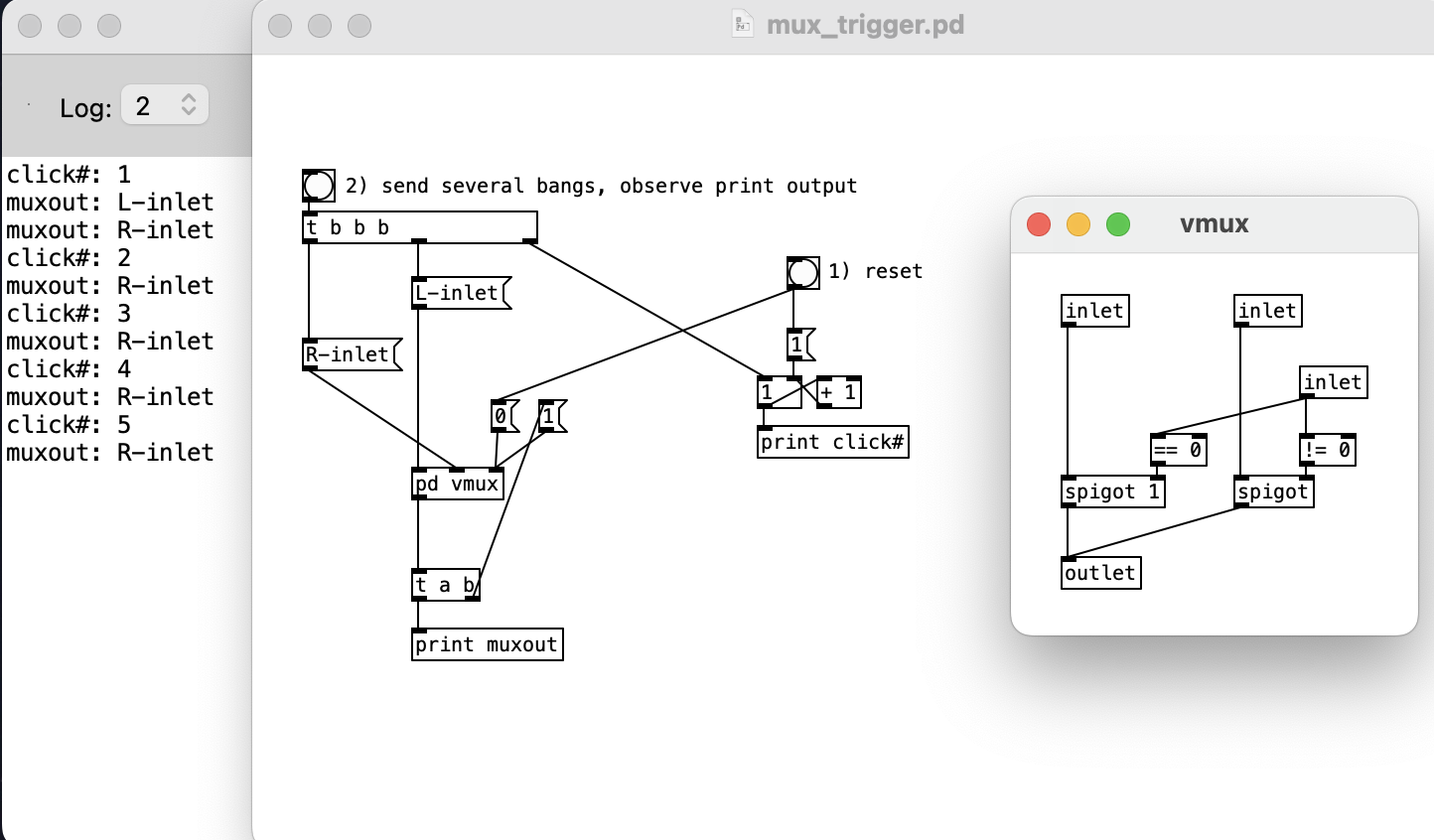
...and since [receive] can't be reassigned on the fly as [send] can, seems like yet another approach is needed. Whew! -
posted in technical issues • read more
@lacuna @oid Thank you both for the ideas! This is a bit of a brain twister, eh?
Indeed, I've been swapping this subpatch in to my patches as a direct replacement for zexy/demux, thus it needs to behave exactly the same way. As noted, [t a a] internally isn't reversible, and fails if the use case is "send to right outlet, then do 2nd+ops and immediately set vdemux back to inlet 0".
The [send] and [pipe 0] solutions do work for both outlets! I have mild concerns about each though, mostly stemming from my own ignorance:
I read somewhere (either Pd-list or Pd's github, can't find it ATM) a dev conversation about how Pd can struggle when its symbol table fills up, and I vaguely remember seeing a proposed PR to allow for dynamic expansion of the symbol table. The [send] solution would create two new symbols for every [vdemux] abstraction, and I use a gazillion of these demuxes in my already-huge performance patches. Maybe I'm nowhere near the number of symbols that would be problematic, dunno, but other than that concern this does seem like the cleanest solution.
As for [pipe 0], that just melts my brain... I get that it breaks execution order, but it seems like it should move the incoming [0( or [1( later in the execution order, rather than sooner. But it actually causes this part to execute first? Regardless, I get the feeling that this isn't a wise behavior to rely upon.
-
posted in technical issues • read more
Hi all, DOH!!! After ripping my hair out for days I just tracked down the source of a problem I've been running into:
I made a few simple vanilla abstractions for multiplexing & demultiplexing, meant to be replacements for zexy/mux and zexy/demux, as I'm working on some patches that I'd like to run in PdParty on iOS & thus can't use non-vanilla external libraries. Unfortunately it looks like I made some assumptions that were false, and I think it has to do with order of operations.
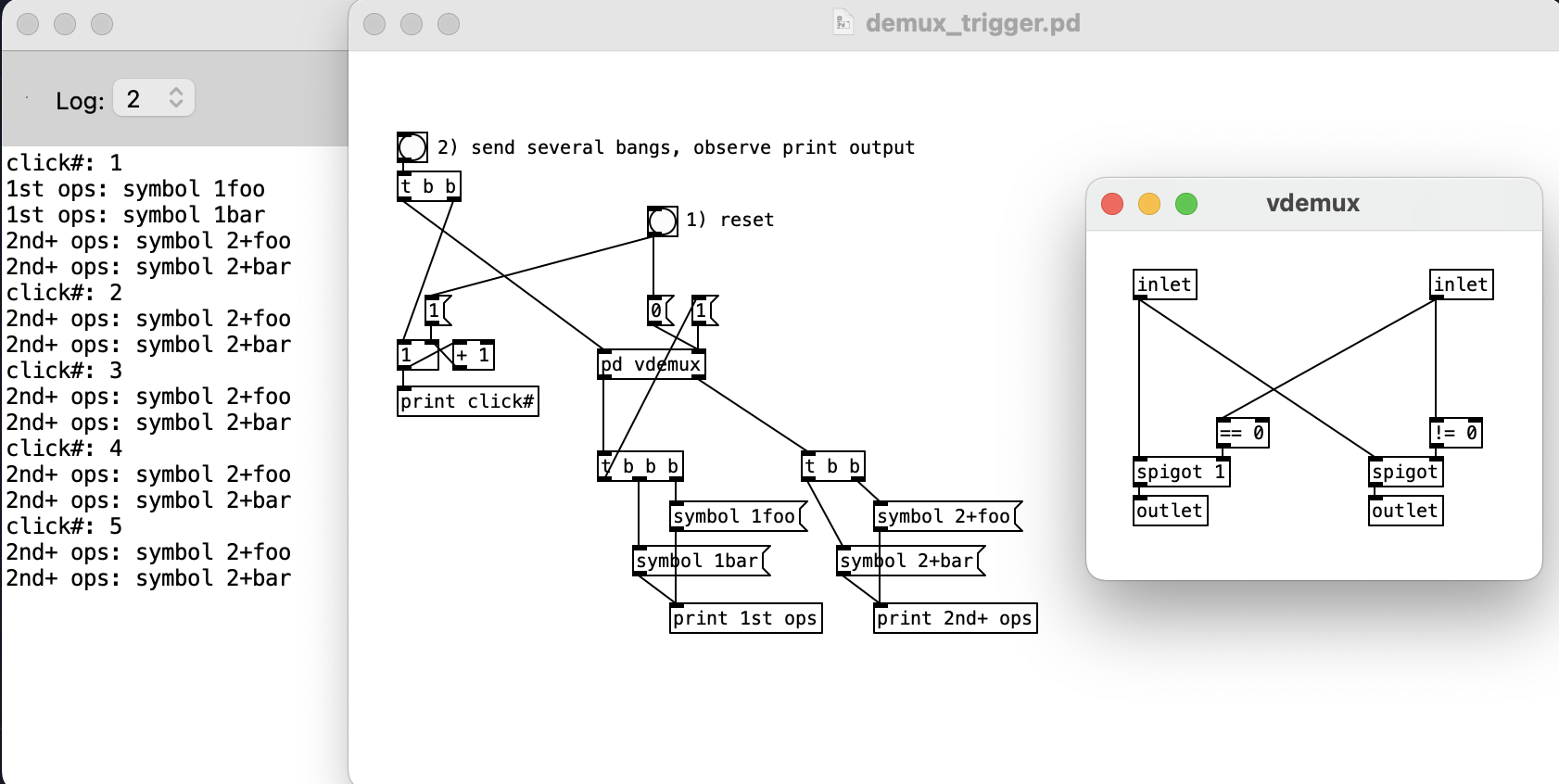
Below is a basic patch showing the problem with my [vdemux] design. In this case I'm using it to route the first incoming bang to [vdemux]'s left outlet, then subsequent incoming bangs to its right outlet. But, as the console shows, after the 1st operations are complete & the [t b b b] sets [vdemux] to open its right outlet, another unexpected bang is then sent to the right outlet.
Perhaps because of G05.execution.order I confused myself into thinking that a subpatch/abstraction would complete its non-signal operations before sending bangs to its outlets, but apparently adding a trigger after [vdemux]'s left outlet means all subsequent triggered operations will run their course before [vdemux] has even sent its should-be-blocked bang to the right outlet.
Does anyone have an idea for how to solve this? I'd like to be able to guarantee that all internal banging within [vdemux] is complete before passing anything to its outlets, regardless of whatever is connected further down the chain, without having to get sloppy & add [del 1] or something sketchy like that.
-
posted in extra~ • read more
@jo Hi there,
To my eye the Unauthorized library looks rather abandoned, I'm not sure if the source code is on Github or elsewhere but a quick search didn't turn up anything promising. There are a bunch of other Pd-Extended era libraries that are similarly unmaintained.
There is a version in Deken (Help menu -> Find externals) called:
unauthorized-v0-0extended-(Darwin-i386-32)(Darwin-PowerPC-32)(Darwin-x86_64-32)
I think libraries with that "v0-0extended" name were taken directly from one of the final versions of Pd_Extended, and if there is no more recent version, that's a likely sign that the library is unmaintained. Since Darwin-x86_64-32 is listed, it seems your only option for using these objects is to run Pd with Rosetta 2 (Intel emulation) and reinstall the library with Deken. I also recently migrated from Intel to M2, and since my patch is dependent on a whole bunch of abandoned libraries, I'm currently running everything in Intel mode. It'd be great to have more native Apple Silicon versions of older libraries, if enough savvy Mac users are able to find the source code repos & compile updated versions.As for those specific objects you mentioned, I haven't used either, so unfortunately I don't have a good recommendation for replacements.
-
posted in technical issues • read more
@Load074 Glad to hear it! Nice lookin waveform there.
-
posted in technical issues • read more
@Load074 Over the past few years I've also been trying out various approaches along the lines of what you're looking for, and actually tried something rather similar to your idea: pulling only one sample per x samples of the source array and sending to a smaller display array. And indeed, it doesn't work because those values are just scattered snapshots of the signal & will be discontinuous with the neighboring display samples. I realized that some kind of averaging would be needed, started to work on it, then got sidetracked & never followed through...

But, I ended up finding two pre-baked solutions:
rh_wavedisplay from netpd
pp.waveform from AudioLabI can't quite wrap my head around how rh_wavedisplay works from looking inside the abstraction, but the result looks nice. From the help patch:
This abstraction finds the minima and maxima for each section of the source table that covers one pixel of the display array. The result is a good looking waveform that does not suffer from aliasing.
I also like that it allows for only a section of the source array to be used for display (which is important for how my performance patch uses arrays). In practice it still causes audio dropouts when updating large source arrays, unfortunately.pp.waveform uses data structures, which is why the result looks so different visually. I don't understand data structures enough to play around with this or try to adapt it for my uses, but I would be definitely curious about whether it's any more efficient than those other graphical array manipulation methods.
I also wonder if there's simply no method that will prevent audio dropouts without some kind of array manipulation that can run on a different thread. I've been looking into the shmem library to see if it's possible to outsource the array processing to another Pd instance (similar to the Pd~ approach that @alexandros suggested), haven't gotten very far so I still don't know if there will be a bottleneck when dumping a huge array to memory.
-
posted in technical issues • read more
@beep.beep - i'm running fully usb-tethered with all wi-fi bluetooth mobiledata off. can you have a look and see if this will solve your "OSC only works with wi-fi" issue?
@esaruoho Confirmed! Using your clues I was able send OSC over USB with wifi disabled. Nice to discover that my hacky workaround is no longer necessary! I’ve updated my other TouchOSC thread to point back to our present thread here, if there’s more to discuss on this subject please continue to do so here instead of replying to multiple threads, it makes it quite difficult for others to follow over time.
When I connected my iPad to my Mac & ran “arp -a” in the Mac’s terminal, I only saw one listing: the iPad’s IP address (unlike your screenshot, where you had many entries). This did enable me to at least send from Pd to TouchOSC, but since no IP was listed for my Mac I couldn’t send in the other direction.
Then — for reasons unknown — after fiddling with netsend/netreceive for a bit, “arp -a” then returned a 2nd entry for “broadcasthost (255.255.255.255)”. I’m not a networking expert but some quick searching indicates that this IP can be used to broadcast messages over a local network, so I tried entering 255.255.255.255 for “Host” in TouchOSC and voila, I can send to Pd! This also works the other way with “connect 255.255.255.255 9000” into [netsend -u -b], which successfully sends to TouchOSC on port 9000. I don’t know if there’s an efficiency downside to using a broadcast IP versus a direct IP, but if not this seems to simplify things a lot!
@ddw_music looking at your earlier comment, I didn’t know about netreceive’s -f flag either, that’s great to know! I tried your autoconnect logic and it works nicely, although of course it still requires the iPad to be configured correctly before doing its magic. I guess if there’s truly no harm in leaving TouchOSC’s host set to 255.255.255.255 and “broadcasting” all outgoing OSC data, maybe that’s about as close to zero-config as one can get?
edit: the above tests were done with a 2016 Macbook Pro and iPad 5th gen; when I tried these approaches with my much older 2008 Macbook and iPad 4th gen (both with older OS's) I did not succeed... so this all might be dependent on relatively recent hardware/software.
-
posted in I/O hardware diy • read more
Update: turns out enabling wifi on the iPad is not necessary after all! See this thread with various discussion throughout on the subject.
-
posted in I/O hardware diy • read more
@esaruoho said:
Are you.... you're serious? do i really have to have wi-fi on, even if no wi-fi connection, for OSC to work over USB tethering?
Ha, well yes, I am serious! I was sharing the result of beating my head against this problem for 30-40 hours, in the hopes that others might not waste their time in a similar manner. It's entirely possible that there is a better & more reliable method to achieve this connection, I simply shared the solution that worked for me.
This post of yours is from 7 years ago, is this still the case in 2023?
In one of your other current threads I mentioned that I just tested this setup yesterday, and bi-directional OSC over USB is still working for me. Of course these are versions of TouchOSC/studiomux/midimux that I installed 7 years ago, it's entirely possible that there have been breaking changes in these apps since then.
it's a 100% dealbreaker. i don't want wifi on and don't need it for anything.
My solution was to carry a cheap mini wifi hub and just connect my iPad to its network; neither was connected to the internet (nor was my computer) and as far as I could tell no data was actually sent over the wifi network. Again, this was the only way I could figure out how to convince TouchOSC to send OSC over the USB connection. Maybe there's a better way, if you find it please do share your findings!
guess i'm stuck in MIDI over USB?
It did seem like wired MIDI connections were easier to set up when I did this in the past, and it sure seems like that's still an option. I went through the trouble to get OSC working because I'm lazy & grew tired of dividing/multiplying all control data by 127...
-
posted in technical issues • read more
@esaruoho said:
and also feel a bit like there's no "TouchOSC with PureData for idiots" blog-post for iPad / macOS going on, or at least i haven't been able to find it.
As I mentioned in another recent thread of yours where you were exploring iPad control options, I had some experiences with this type of setup several years ago:
https://forum.pdpatchrepo.info/topic/10184/touchosc-direct-usb-connection-finally-possible-with-midimuxI just tested it & it's still working. (7 years later!) I have midimux & TouchOSC running on the iPad, and studiomux & Pd running on my Mac. As mentioned in my old thread, the iPad must be connected to wifi (any active network, doesn't matter which) in order to send OSC data over the tethered USB connection.
And yes, you will most certainly need to know the IP addresses of the Mac & iPad (for use with [netsend] in Pd, and with TouchOSC on the iPad). I don't know of a way to ensure that they will be persistent, I've always had to reenter them manually every time. Also make sure your in/out port numbers are in order (again, on the Pd side for [netsend] and [netreceive], and on the iPad you can set the in/out port numbers in midimux).
Ah, and finally I'm using [netreceive -u -b] into [oscparse] and [list trim] for receiving in Pd, and [oscformat foo bar etc] into [list prepend send] then [list trim] then [netsend -u -b] for sending out from Pd.
-
posted in technical issues • read more
@esaruoho I did something similar to what you're trying to do with TouchOSC, although in my case I was specifically using OSC rather than MIDI. It's been years since I've used this setup but here's my old post from when I was setting it up in case any of the info is helpful:
https://forum.pdpatchrepo.info/topic/10184/touchosc-direct-usb-connection-finally-possible-with-midimux(tldr: I had to turn the iPad's wifi on for the USB connection to work)
Also, my experience was long enough ago that there could be much easier ways to do this nowadays. It looks like there's a new version of TouchOSC that I haven't checked out, so maybe there's an easier way in 2023?
-
posted in technical issues • read more
@seb-harmonik.ar Thanks again!
For anyone else who's following:
https://github.com/pure-data/pure-data/issues/1823
https://github.com/MetaluNet/moonlib/issues/20 -
posted in technical issues • read more
@seb-harmonik.ar Yes indeed, thank you! The Console app brought the crash report right up.
And I think I may have quickly found the likely culprit: mknob (from moonlib), which crashes if I bring up the help patch. If that's true, I wonder if this should be a bug report for the external itself (perhaps this repo?) rather than Pd? Or might it still be useful for the Pd devs to see this if other externals could also be broken due to a change in Pd 0.53?
One other question: when the time comes, what's the preferred format for submitting a crash log? Paste the entire thing into a Github issue, or is there a cleaner way?
-
posted in technical issues • read more
@Load074 Similar (or same) issue for me on macOS Monterey, certain gigantic older patches of mine are crashing Pd 0.53 when trying to open. I've been doing a bit of initial research into how to generate a crash log (which I've never done & have no idea where to begin) for submitting a bug report to Github, but free time is a bit scarce at the moment. Any quick pointers for doing so are welcome!
The only initial thing I could think to do was to start Pd via command line... saw "segmentation fault" but no other clue about what the error might be.
-
posted in technical issues • read more
@Metronome I probably experienced somewhere in the neighborhood of 8-10 headphone explosions when I was new to Pd, and possibly suffered some nonzero amount of hearing damage as a result, so I can very much relate to your question.


Ultimately I came to accept this as inseparable from the nature of Pd as a programming language, in that it gives you the raw tools to do pretty much whatever you like (including things that may not be advisable, either for your ears or your computer). Nowadays I always approach any unfamiliar patch (a help patch, demo from this forum, or anything whatsoever) with caution; I always take a look at what's going into [dac~] first, as many of my past unpleasant experiences came from patches where the author simply connected a number box with no defined upper limit directly into the right inlet of [*~] as gain control, meaning that if you mouse directly on the number box to turn up the volume (without shift-clicking), it's quite easy to slip & blast your ears in an instant.
For my own patch, I used zexy's [limiter~], which lets you specify an output limit in dB; you could make an abstraction which wraps such a limiter, and make sure to always add it in before [dac~] as a safety precaution in any patch you open. Or, when opening patches, just watch out for sketchy output levels before turning on DSP, and if necessary edit the patch first (perhaps [*~ 0.1] or [/ 100] or [dbtorms] may come in handy in these situations, if you catch my drift).
It is worth noting though that accidental volume spikes in general are certainly not unique to Pd, and keeping headphone/speaker volume low at first when checking levels is simply good practice with any speaker in any application.
-
posted in technical issues • read more
@Kosmas Hi there, I haven't (successfully) used jack on Mac (I'm also on 10.15.7), but this is what I use to run Pd from the terminal:
/Applications/Pd-0.51-3.app/Contents/Resources/bin/pd /Users/*your*/*path*/*to*/*your*/patch.pd```I also use several flags depending on what other options I want (-nogui, -channels, -audiobuf, etc.), maybe the -audiodev or -jack flags would get things working? I think I've seen some discussion recently on Pd-list/Github about jack & macos, and if memory serves, it isn't a simple solution...
-
posted in technical issues • read more
@ricky Hmm, I don't have experience with that particular error, but it's possible your hunch is correct.
The first time an app requests to use the mic, the webcam, access certain directories, etc., the OS will throw a popup at you asking if you want to grant permission. Either way you answer, you can change this later in System Preferences / Security & Privacy / Privacy / Microphone.
If that doesn't work, you might need to do some more searching (this forum, Pd-list, Pd's github, stack exchange, and so on). But I hope the easy solution works out for you!