-
 solipp
posted in technical issues • read more
solipp
posted in technical issues • read moreBut a delay line gives you the circular buffer for free. It isn't the first thing you'd think of but it is so much easier.
Pitch shifting can be done by modulating the delay time. If you're playing a 100 ms grain, run a line~ with "100, 0 100" as the delread4~ delay time and you'll get 2x speed, 2x frequencies.
hjh
a bit late to the party, but wanted to emphasize on this.
You can imagine delwrite~ as a tape loop that is constantly being written to and delread4~ as a movable tape head. So, if you have a circular buffer of 1000ms with [delwrite~ foo 1000], you can position the tape head at any point of the loop, like [delread4~ foo 400] and you hear the sound with a delay of 400ms... or you can move the head across the entire length of the loop in 1000ms like this:[0, 1000 1000(
|
line~
|
delread4~ foo...and you hear a second of silence, because the head moves at exactly the same speed as the tape and therefore outputs just a single sample for one second.
As @ddw_music mentioned, if you want to pitch up one octave, you move the tape head against the direction of tape travel, so that the relative speed of the tape is twice as fast.
And if you want to reverse playback, you move the tape head twice as fast in the direction of tape travel, so that the tape in relation to the head moves in the opposite direction:[0, 1000 500(
|
line~
|
delread4~ foo -
solipp
posted in technical issues • read more
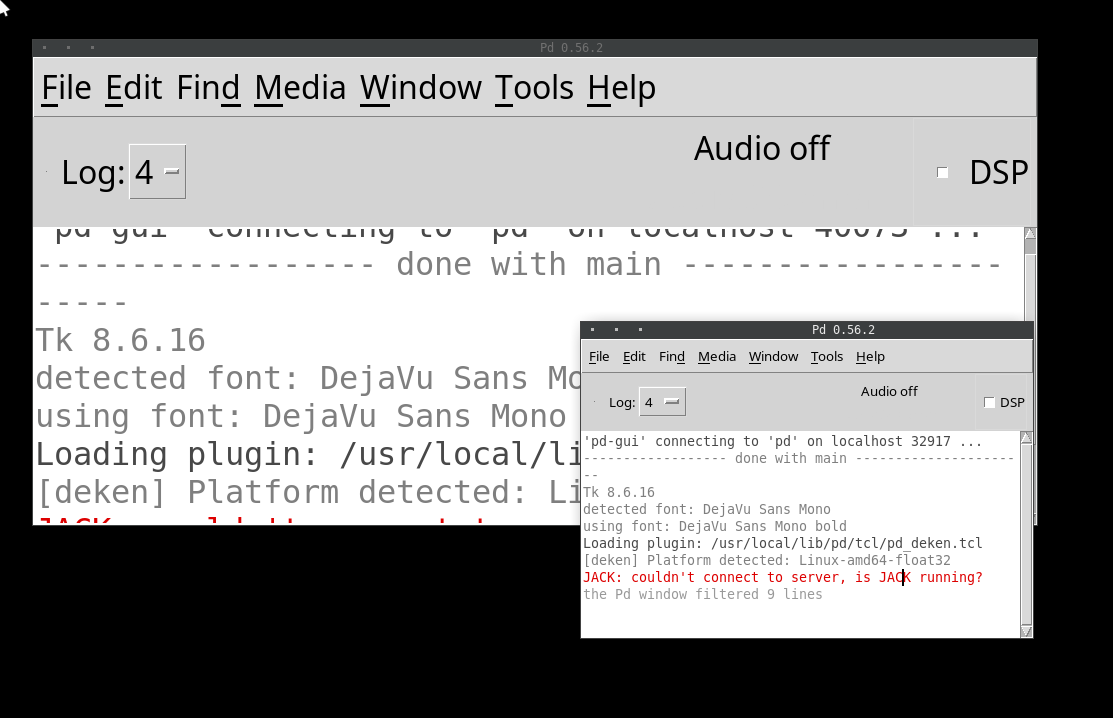
Sure. You can interact with objects. But, anything that requires a menu or a dialog box, you'd better take off your glasses, get right up to the screen, and squint. In the Windows screenshot above, menus look normal size and everything else looks big. That isn't at all what you see on a high(er) DPI monitor (2880 x 1800 here). If I zoom in on a patch, I see normal-size objects and teeny tiny menus.
And changing the font size doesn’t help?
Here is font size 10 compared to font size 24 on a my screen, also on XFCE:
-
solipp
posted in technical issues • read more
@ddw_music you can compile pd with this PR: https://github.com/pure-data/pure-data/pull/1659
-
solipp
posted in news • read more
@jamcultur this would be easy to fix, but pd currently has no method to get the zoom factor of a patch window. I filed a pull request to add this to [pdcontrol]; https://github.com/pure-data/pure-data/pull/2846 let's see if it makes it into the next release.
Here is a larger version of pp.xypad that you can use: xypad-large.zip
-
solipp
posted in news • read more
Version 0.80 is now available.
-
3 new objects: [pp.distort~] and [pp.dystort~] for distortion and saturation effects, and [pp.xypad], which is a 2D controller that allows you to record and play back moves.
-
[pp.fft-partconv~.s] runs cpu-heavy partition convolution in a subprocess using [pd~]
-
A new example shows how to use [pp.grainer~] as a polyphonic granular synth.
-
New control rate outlets for [pp.lfnoise~], [pp.shiftlfo~] and [pp.adsr~].
-
[pp.vcfilter~] now has an option for an audio rate notch filter.
-
[pp.sfplayer~]: new option to write recorded audio to file
-
many bugfixes etc.
Happy patching!
-
-
solipp
posted in technical issues • read more
I'm trying to extract level crossings between 2 signals, [...] and use that to switch signals.
the patch i posted above does this. However, it doesn't generate a trigger (one sample impulses?) from each crossing...
I do think it's very similar to what [max~ ] is doing, unless I'm misunderstanding?
mh i don't know. It depends on what you do with [max~], which is not clear to me.
For my purposes, I'll need a stream of triggers to gate a trigger (vs gate) stream that I'm going to gate with another process so that trigger signals only pass when the other process opens to gate the level crossing triggers. The problem is, then I need a flipflop/toggle...
This works, for reference:
...looks like you found a solution(?) I'm wondering if you even need to generate/process a stream of audio rate triggers to achieve your goals. I know supercollider uses audio rate triggers, but in pd it is a bit tricky to work with this concept.
-
solipp
posted in technical issues • read more
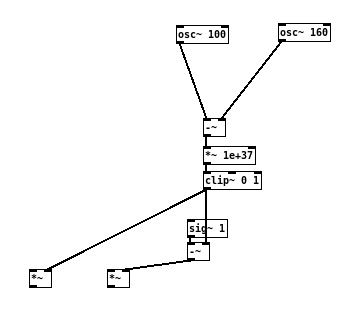
like this, maybe?
Edit: multiplication with smaller values should also be sufficient: [*~ 1e+12]
-
solipp
posted in technical issues • read more
i missed this somehow. It is fixed now in the github repo and will be included in the next deken upload.
-
solipp
posted in news • read more
@jyg said:
just out of curiosity : why did you move to "deprecated" some objects (for example : pp.rev~) ?
because I am not planning to develop them any further (i don't use them anymore) and there are better alternatives, such as pp.phiverb~. I'm keeping them for anyone who wants to use them, Just copy from the deprecated folder.
There is a lot of stuff I'd like to change in this library, particularly the names of some of the objects. "pp.phiverb~" "pp.butterkreuz3~" etc., just horrible! plain stupid. I don't know who came up with this. So whenever i make a fundamental change in the future, i will keep a copy of the old stuff in the deprecated folder. However, the worst is the name of the library itself; "Audiolab" ... I hate it!
Too late to change that now i suppose
-
-
solipp
posted in news • read more
@jyg said:
Did you re-upload the latest audiolab 0.71.1 ?
yes, i re-uploaded, thanks to this comment from IOhannes in the list:
what i can say is, that the "audiolab" package includes both a "LICENSE"
file and a "License/" directory.
this is not a problem on case-sensitive filesystems (like ext2/3/4 on
linux), but it cannot work on case-insensitive filesystems (like FAT32,
NTFS or HFS+).I was not aware of this and it was on my end to fix it, so thank you for bringing it up in the list!
Edit: the version number is the same, 0.71.1 because nothing has changed in the files except that LICENCE is now called LICENSE.txt.
If anyone else had issues with the install from deken, please try again.Thanks again for helping to clear this up!
-
solipp
posted in news • read more
@jyg hm so i just checked if i missed something and if it is actually common practice to share files on deken with group and global write permissions. But that doesn't seem to be the case, here is a part of
zipinfooutput of else-v1.0-0_rc14 for example:

Is installing else causing trouble for you?
Could it be that you are having this problems because you are logged in as admin, not as user or you are trying to unpack these files to a protected folder or something like this?If it helps i can re-upload the files with extra write permissions.
-
solipp
posted in news • read more
@jyg someone reported a similar issue with the deken installation on a Windows OS on github. I can not reproduce this on Linux and i don't know what could be causing it, so my suspicion was that it is somehow related to Windows security permissions. Are you using Windows? Does this happen with other libraries as well? Unfortunately, there is not much i can do about it, but i'll test as soon as i have access to a Windows machine.
For now, if you want to stay up to date you can download from github and set the path manually in pd settings.Edit: just saw that you created another issue about this on github. I'll close it because it is not related to the development of this library, but we can continue the conversation here.
-
solipp
posted in news • read more
@jamcultur thanks! You can save any of these objects with a message [save 1( to the rightmost inlet. Then use [recall 1( to retrieve your parameter settings. You can save up to 21 presets this way. This is also documented in the help files and in Examples/01-basics.pd
-
solipp
posted in technical issues • read more
you can find the paf~ external in one of the pieces that Miller shares with the Pure Data Repertory Project (in /externs/paf~/):
https://msp.ucsd.edu/pdrp/latest/manoury-enecho.tgz -
solipp
posted in technical issues • read more
@Moothart i never used [abl-link~], so i don't know how it behaves exactly. You can try something like this maybe
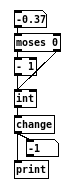
or use the set method for change (check the helpfile) -