
-
Moddmo
posted in technical issues • read moreThank you! I will play around with this.
And fair enough, crap vs. quality sound is subjective. I guess a better question is if pd has disadvantages here compared to other DSP programming languages.
-
posted in technical issues • read more
I'm having fun with granular processing of samples and live input of acoustic instruments.and I'm thinking about making a granular processor in pd.
I've tried several granular apps and software (I love Grainstorm on Android) but I keep seeing interesting possibilities that none have implemented, especially for live manipulation.
I don't want to spend months making a patch and end up with crap sound. Would I be able to make granular patches with sound quality at least close to the available granular software? I have a good grasp of pd/Max. Any tricks/pitfalls you can think of (besides declicking)? Thanks!
-
posted in technical issues • read more
@whale-av Thanks! I already tried the Asoundrc thing but in the end Jack (more specifically a patched jackd1 and alsa_in) turned out to work well. I'm able to get decent latency using these two cards
-
posted in technical issues • read more
I'm pretty new to pd and I want to make a very basic looper that just loops audio in.
Maybe it's better described as a repeater. I just want to be able to listen to audio input, toggle 1 to start recording, toggle 0 to stop recording and instantly start the loop.
I've looked at some patches here on the forum and in the tutorials and put together something using tabwrite~ and tabread~ (plus timer and phasor):
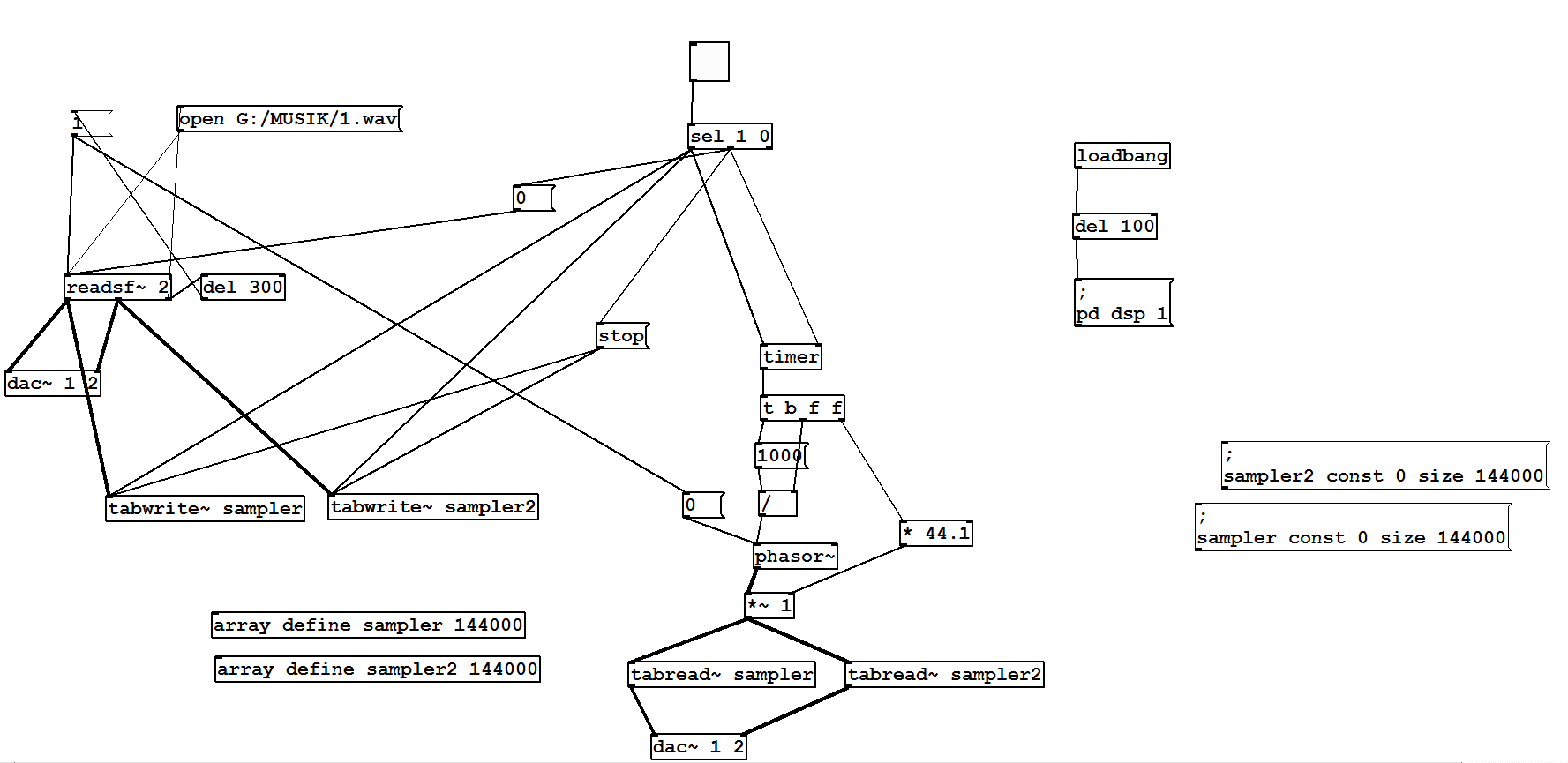
The problem I'm running into is that the first loop I hear right after I stop rec / start loop is always slightly longer than the ones that follow. The interesting thing is that this does NOT happen the first time I load the patch and loop. The first time it sounds fine and consistent. It's only after the first time that these problems come up. I'm hoping this is the key clue for a patch detective
: ) -
posted in technical issues • read more
I needed a cheap way to get audio in/out of PD on RPI so I bought a couple of these tiny white USB soundcards with line out and mic input (less than a dollar each) as I'd read here that they work with RPI.
http://raspberrypimaker.com/cheap-quality-audio-raspberry-pi/
They work ( RPI1, model B ), and the output is decent, but there's an annoying high-pitched hum originating from the mic input that is probably due to the proximity of the ADC to the DAC on the unit.
I though I'd solve it by using one card for the mic input and another for the output.
As far as I understand, this should be possible using the -audiodevout options in the pd command line (or the gui settings). Neither of these have worked for me. Specifically, pd outputs from the same card, even though I specify the correct device number in =audiodev or -audiodevout. Both cards work well when used alone.
I'm guessing the problem is that pd sees the two devices (or at least refers to them) as identical. This is the output from pd -nogui -alsa -listdev
audio output devices:
- bcm2835 ALSA (hardware)
- bcm2835 ALSA (plug-in)
- USB PnP Sound Device (hardware)
- USB PnP Sound Device (plug-in)
- USB PnP Sound Device (hardware)
- USB PnP Sound Device (plug-in)
So even though one card is here listed as device 3-4, and the other as 5-6, pd always plays audio from the same card when given any of the numbers in -audiodev. / -audiodevout.
I'm very inexperienced with linux in general, but it seems that since alsa does give these two devices a unique name/number, pd. should be able to distinguish between them. This is the output from alsa -l
**** List of PLAYBACK Hardware Devices ****
card 0: ALSA [bcm2835 ALSA], device 0: bcm2835 ALSA [bcm2835 ALSA]
Subdevices: 7/7
Subdevice #0: subdevice #0
Subdevice #1: subdevice #1
Subdevice #2: subdevice #2
Subdevice #3: subdevice #3
Subdevice #4: subdevice #4
Subdevice #5: subdevice #5
Subdevice #6: subdevice #6
card 0: ALSA [bcm2835 ALSA], device 1: bcm2835 ALSA [bcm2835 IEC958/HDMI]
Subdevices: 1/1
Subdevice #0: subdevice #0
card 1: Device [USB PnP Sound Device], device 0: USB Audio [USB Audio]
Subdevices: 1/1
Subdevice #0: subdevice #0
card 2: Device_1 [USB PnP Sound Device], device 0: USB Audio [USB Audio]
Subdevices: 1/1
Subdevice #0: subdevice #0Any advice would be greatly appreciated!